Webhooks Integration
Send browser reports to any HTTP endpoint for maximum flexibility in your observability pipeline.
The webhook integration sends W3C browser reports to your custom HTTP endpoints as JSON payloads. This gives you complete control over how reports are processed, stored, and acted upon. Use webhooks to integrate with any system that can receive HTTP POST requests.
Prerequisites
Before setting up the webhook integration, you'll need:
- A reporting-api.app application — With reports already flowing (see Getting Started)
- An HTTP endpoint — A URL that can receive POST requests with JSON payloads
- Optional: A signing secret — For HMAC signature verification (recommended for production)
Configuration
Step 1: Open Your Application Settings
In reporting-api.app, navigate to your application and click Edit to open the application settings. Scroll down to the Integrations section.
Step 2: Add Webhook Integration
Click Add Webhook to create a new webhook notification target. Enter your webhook URL in the form.
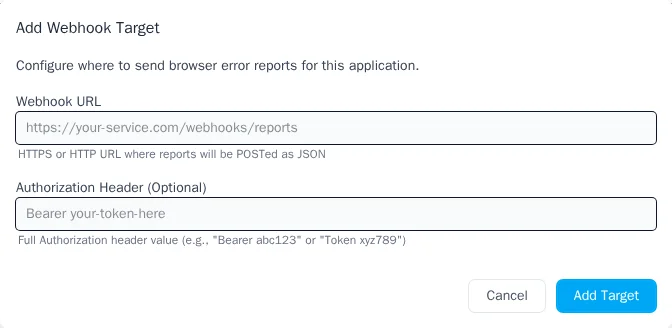
https://your-server.com/webhooks/browser-reports
Both HTTP and HTTPS URLs are supported, though HTTPS is strongly recommended for production environments.
Step 3: Configure Authentication (Optional)
You can configure two types of authentication for your webhook. Use either or both depending on your security requirements.
Bearer Token Authentication
Enter a bearer token in the Authorization header field. This token will be sent with every webhook
request in the Authorization header.
Bearer your-secret-token-here
HMAC Signature Verification
Enter a signing secret in the Signing secret field. This enables HMAC-SHA256 signature verification, the industry standard for webhook security used by Stripe, GitHub, and other major platforms.
Step 4: Enable the Integration
After saving, ensure the integration is enabled. You can toggle integrations on and off without losing your configuration.
Payload Format
When a browser report arrives, reporting-api.app sends a JSON payload to your webhook URL via HTTP POST.
Payload Structure
{
  "event_type": "browser_report",
  "schema_version": "1.0",
  "received_at": "2025-01-15T10:30:00Z",
  "report_type": "csp-violation",
  "app": {
    "name": "My Application",
    "environment": "production"
  },
  "organization": {
    "name": "Acme Corp"
  },
  "report": {
    "blockedURL": "https://evil.com/malicious.js",
    "effectiveDirective": "script-src-elem",
    "disposition": "enforce",
    "documentURL": "https://example.com/checkout",
    "originalPolicy": "default-src 'self'; script-src 'self'; report-to default"
  }
}
Payload Fields
| Field | Description |
|---|---|
event_type |
Always "browser_report" for W3C reports |
schema_version |
Payload schema version (currently "1.0") |
received_at |
ISO 8601 timestamp when the report was received |
report_type |
Type of report: csp-violation, deprecation, intervention,
integrity-violation, etc.
|
app.name |
Name of your application in reporting-api.app |
app.environment |
Environment: production, staging, or development
|
organization.name |
Name of your organization |
report |
The complete W3C report body (structure varies by report type) |
Example: Deprecation Report
{
  "event_type": "browser_report",
  "schema_version": "1.0",
  "received_at": "2025-01-15T14:22:00Z",
  "report_type": "deprecation",
  "app": {
    "name": "My Application",
    "environment": "production"
  },
  "organization": {
    "name": "Acme Corp"
  },
  "report": {
    "id": "UnloadHandler",
    "message": "Unload handler is deprecated",
    "anticipatedRemoval": "2025-06-01",
    "sourceFile": "https://example.com/app.js",
    "lineNumber": 142,
    "columnNumber": 8
  }
}
Webhook Headers
Every webhook request includes the following HTTP headers:
| Header | Description |
|---|---|
Content-Type |
application/json; charset=UTF-8 |
User-Agent |
reporting-api.app/notification-dispatcher |
X-Webhook-Timestamp |
Unix timestamp (seconds since epoch) for replay prevention |
X-Request-ID |
Unique request ID for idempotency (same ID on retries) |
X-Webhook-Signature |
HMAC-SHA256 signature (only if signing secret is configured) |
Authorization |
Bearer token (only if authorization header is configured) |
Signature Verification
When you configure a signing secret, every webhook includes an X-Webhook-Signature header containing an
HMAC-SHA256 signature. This allows you to verify that:
- The webhook genuinely came from reporting-api.app
- The payload hasn't been tampered with in transit
- The request isn't a replay of an old webhook (using the timestamp)
Signature Format
The signature header follows this format:
X-Webhook-Signature: v1=5257a869e7ecebeda32affa62cdca3fa51cad7e77a0e56ff536d0ce8e108d8bd
The v1= prefix indicates the signature version. The signature is computed as follows:
- Concatenate the timestamp and payload:
"{timestamp}.{json_payload}" - Compute HMAC-SHA256 using your signing secret as the key
- Convert the result to a lowercase hexadecimal string
- Prepend
v1=to indicate the signature version
Node.js Verification Example
const express = require('express');
const crypto = require('crypto');

const app = express();

// Important: Use raw body for signature verification
app.use('/webhooks', express.raw({ type: 'application/json' }));

const SIGNING_SECRET = process.env.WEBHOOK_SIGNING_SECRET;

function verifySignature(payload, timestamp, signature) {
  const signedPayload = `${timestamp}.${payload}`;
  const expectedSignature = 'v1=' + crypto
    .createHmac('sha256', SIGNING_SECRET)
    .update(signedPayload)
    .digest('hex');

  // Use timing-safe comparison to prevent timing attacks
  return crypto.timingSafeEqual(
    Buffer.from(signature),
    Buffer.from(expectedSignature)
  );
}

app.post('/webhooks/browser-reports', (req, res) => {
  const timestamp = req.headers['x-webhook-timestamp'];
  const signature = req.headers['x-webhook-signature'];
  const requestId = req.headers['x-request-id'];

  // Verify the signature
  if (!verifySignature(req.body, timestamp, signature)) {
    console.error('Invalid webhook signature');
    return res.status(401).json({ error: 'Invalid signature' });
  }

  // Optional: Check timestamp to prevent replay attacks (5 minute tolerance)
  const timestampAge = Math.floor(Date.now() / 1000) - parseInt(timestamp);
  if (timestampAge > 300) {
    console.error('Webhook timestamp too old');
    return res.status(401).json({ error: 'Timestamp too old' });
  }

  // Process the webhook
  const payload = JSON.parse(req.body);
  console.log(`Received ${payload.report_type} report:`, payload);

  // Use requestId for idempotency if needed
  // e.g., check if you've already processed this requestId

  res.status(200).json({ received: true });
});

app.listen(3000, () => {
  console.log('Webhook receiver listening on port 3000');
});
MuleSoft Verification Example
For MuleSoft Anypoint Platform, use DataWeave's built-in Crypto module to verify webhook signatures.
<?xml version="1.0" encoding="UTF-8"?>
<mule xmlns:http="http://www.mulesoft.org/schema/mule/http"
      xmlns:ee="http://www.mulesoft.org/schema/mule/ee/core"
      xmlns="http://www.mulesoft.org/schema/mule/core">

  <!-- HTTP Listener for incoming webhooks -->
  <http:listener-config name="webhook-listener">
    <http:listener-connection host="0.0.0.0" port="8081"/>
  </http:listener-config>

  <flow name="webhook-receiver-flow">
    <http:listener config-ref="webhook-listener" path="/webhooks/browser-reports"/>

    <!-- Verify signature using DataWeave -->
    <ee:transform>
      <ee:message>
        <ee:set-payload><![CDATA[%dw 2.0
import dw::Crypto
output application/json

var timestamp = attributes.headers.'x-webhook-timestamp'
var receivedSignature = attributes.headers.'x-webhook-signature'
var rawPayload = write(payload, "application/json")
var signedPayload = timestamp ++ "." ++ rawPayload

var expectedSignature = "v1=" ++ Crypto::HMACWith(
  p('webhook.signing.secret') as Binary,
  signedPayload as Binary,
  "HmacSHA256"
)
---
{
  isValid: receivedSignature == expectedSignature,
  reportType: payload.report_type,
  receivedAt: payload.received_at,
  report: payload.report
}]]></ee:set-payload>
      </ee:message>
    </ee:transform>

    <!-- Route based on signature validity -->
    <choice>
      <when expression="#[payload.isValid == true]">
        <logger level="INFO" message="Valid webhook received: #[payload.reportType]"/>
        <!-- Process the report here -->
        <set-payload value='{"received": true}'/>
      </when>
      <otherwise>
        <logger level="ERROR" message="Invalid webhook signature"/>
        <http:response statusCode="401"/>
        <set-payload value='{"error": "Invalid signature"}'/>
      </otherwise>
    </choice>
  </flow>
</mule>
Configure your signing secret in src/main/resources/config.yaml:
webhook:
  signing:
    secret: "${WEBHOOK_SIGNING_SECRET}"
Error Handling & Retry Behavior
Webhooks include automatic retry logic for transient failures:
| Response | Behavior |
|---|---|
2xx |
Success — webhook delivered |
429 (Rate Limited) |
Retry with exponential backoff (up to 5 attempts) |
5xx (Server Error) |
Retry with exponential backoff (up to 5 attempts) |
4xx (Client Error) |
Permanent failure — no retry |
| Network timeout | Retry with exponential backoff (up to 5 attempts) |
Idempotency
The X-Request-ID header contains a deterministic ID that remains the same across retries. Use this to
implement idempotent processing:
const processedRequests = new Set(); // Use a database in production

app.post('/webhooks/browser-reports', (req, res) => {
  const requestId = req.headers['x-request-id'];

  // Check if we've already processed this request
  if (processedRequests.has(requestId)) {
    console.log(`Duplicate webhook ignored: ${requestId}`);
    return res.status(200).json({ received: true });
  }

  // Process the webhook...

  // Mark as processed
  processedRequests.add(requestId);
  res.status(200).json({ received: true });
});
Troubleshooting
Webhooks Not Arriving
- Check the integration is enabled — In your application settings, verify the webhook integration toggle is on
- Verify your URL is accessible — Ensure your endpoint is reachable from the internet and not blocked by a firewall
- Check for 4xx errors — If your endpoint returns 4xx errors, webhooks won't be retried. Check your server logs for issues
- Verify reports are flowing — Check your reporting-api.app dashboard to confirm reports are being received
Signature Verification Failing
- Check your signing secret — Ensure you're using the exact same secret configured in reporting-api.app
- Use the raw request body — Don't parse or modify the JSON before computing the signature. The signature is computed on the exact bytes sent
-
Verify the signed payload format — The format is
"{timestamp}.{payload}"with no extra whitespace - Check for encoding issues — Ensure you're treating strings as UTF-8 and the signature comparison uses constant-time comparison
Timeouts
- Respond quickly — Return a 2xx response as soon as you've received the webhook. Process the payload asynchronously if needed
- Connection timeout is 5 seconds — Your server must accept the connection within 5 seconds
- Read timeout is 10 seconds — Your server must respond within 10 seconds of receiving the request
Next Steps
- Google Chat — Get alerts in Google Chat spaces
- AppSignal — Send reports to AppSignal's error tracking
- CSP Violations — Configure Content Security Policy reporting
Resources
- Webhooks.fyi Security Guide — Comprehensive guide to webhook security with HMAC
- GitHub Webhook Validation — GitHub's approach to webhook signature verification
- MuleSoft HMACWith Function — DataWeave cryptographic functions documentation