CSP Violations
Configure Content Security Policy reporting to detect XSS attempts, unauthorized script execution, and policy misconfigurations in real-time.
New to CSP monitoring? Read our CSP Violations overview to understand the benefits before diving into configuration.
What is Content Security Policy?
Content Security Policy (CSP) is a browser security standard that lets you control which resources (scripts, styles, images, fonts, etc.) can load on your web pages. By defining an allowlist of trusted sources, CSP prevents cross-site scripting (XSS) attacks and other code injection vulnerabilities.
CSP works through
HTTP headers. You send a
Content-Security-Policy header with your server responses, and browsers automatically enforce your
rules. When a resource violates your policy, the browser blocks it and can send a violation report to your configured
endpoint.
The policy uses directives to control different resource types: script-src for
JavaScript, style-src for CSS, img-src for images, and so on. Each directive specifies
which origins are allowed to provide that resource type.
Specification
- W3C Content Security Policy Level 3 — Official specification
- MDN: Content Security Policy — Comprehensive developer documentation
Browser Support
CSP has ~93% global browser support, making it one of the most widely supported security features.
| Browser | CSP Support | Reporting |
|---|---|---|
| Chrome | 14+ | report-to (70+) and report-uri |
| Edge | 12+ | report-to (79+) and report-uri |
| Safari | 6+ | report-to (16.4+) and report-uri |
| Firefox | 4+ | report-uri only (no report-to) |
report-to directive. Use both report-to and
report-uri for maximum browser coverage.
Why Monitor CSP Violations?
CSP violations reveal critical security information that's otherwise invisible to your monitoring stack:
- Detect XSS attacks — Blocked script injections indicate attempted attacks on your users
- Discover policy misconfigurations — Legitimate features may be blocked by overly strict policies
- Monitor third-party scripts — Track when external scripts attempt to load unauthorized resources
- Meet compliance requirements — PCI DSS 4.0 mandates script monitoring on payment pages
- Safely test policy changes — Report-Only mode lets you preview the impact of stricter policies
Who Benefits
- Security teams — Gain visibility into client-side attack attempts
- Compliance officers — Maintain audit trails for PCI DSS 4.0, SOC 2, and similar standards
- Frontend architects — Validate CSP policies before enforcement and catch regressions
When to Enable
CSP reporting is recommended for all production websites. Start with
Content-Security-Policy-Report-Only to collect data without blocking resources. Once you've refined your
policy, switch to enforcement mode while keeping reporting enabled for ongoing monitoring.
How to Configure
Step 1: Set Up the Reporting Endpoint
First, define where browsers should send violation reports using the Reporting-Endpoints header:
Reporting-Endpoints: default="https://reporting-api.app/browser-reports/YOUR-ENDPOINT-UUID"
Replace YOUR-ENDPOINT-UUID with your application's unique endpoint from the
Reporting API App dashboard.
Step 2: Enable Report-Only Mode
Before enforcing your policy, test it using the Content-Security-Policy-Report-Only header. This sends
violation reports without actually blocking resources:
Content-Security-Policy-Report-Only: default-src 'self'; script-src 'self'; style-src 'self'; report-to default
Report-Only mode is essential for:
- Testing new policies against production traffic
- Identifying legitimate resources that would be blocked
- Gradually tightening security without breaking features
Step 3: Configure Policy Directives
CSP policies use directives to control resource loading. Here are common configurations:
Basic Policy
Content-Security-Policy: default-src 'self'; report-to default
Moderate Policy
Content-Security-Policy: default-src 'self'; script-src 'self' https://cdn.example.com; style-src 'self' 'unsafe-inline'; img-src 'self' data: https:; font-src 'self' https://fonts.gstatic.com; connect-src 'self' https://api.example.com; frame-ancestors 'self'; report-to default
Strict Policy (Nonce-Based)
Content-Security-Policy: default-src 'self'; script-src 'nonce-{RANDOM}' 'strict-dynamic'; style-src 'self' 'nonce-{RANDOM}'; object-src 'none'; base-uri 'none'; report-to default
Key directives:
default-src— Fallback for all resource typesscript-src— Controls JavaScript loadingstyle-src— Controls CSS loadingimg-src— Controls image sourcesconnect-src— Controls fetch, XHR, WebSocket connectionsframe-ancestors— Prevents clickjacking (replaces X-Frame-Options)
Step 4: Monitor Reports and Refine
After deploying Report-Only mode, monitor incoming reports in your dashboard. Common findings include:
-
Browser extension violations — Extensions inject scripts from
chrome-extension://,moz-extension://,safari-web-extension://, etc. These are false positives from user-installed software. -
Inline script violations — If your app uses inline
<script>tags, you'll need to add nonces or hashes. - Third-party script violations — Analytics, ads, and widgets may load additional resources. Whitelist legitimate ones.
Iteratively refine your policy based on reports until violations represent either attack attempts or known false positives.
Step 5: Enable Enforcement
Once you're confident in your policy, switch from Report-Only to enforcing mode:
Content-Security-Policy: default-src 'self'; script-src 'self'; style-src 'self'; report-to default
report-to enabled even after enforcement. This provides ongoing visibility into blocked attacks and
catches regressions when your application changes.
Step 6: Set Up Integrations
Route CSP violation reports to your existing tools for alerting and analysis:
- AppSignal integration — Track violations alongside application errors
- Webhook integration — Send reports to Slack, PagerDuty, or custom endpoints
- Google Chat integration — Post alerts to team chat spaces
See the Integrations documentation for setup instructions.
Understanding Violation Reports
When a CSP violation occurs, the browser sends a JSON report to your endpoint. Understanding this payload helps you identify threats and fix policy issues.
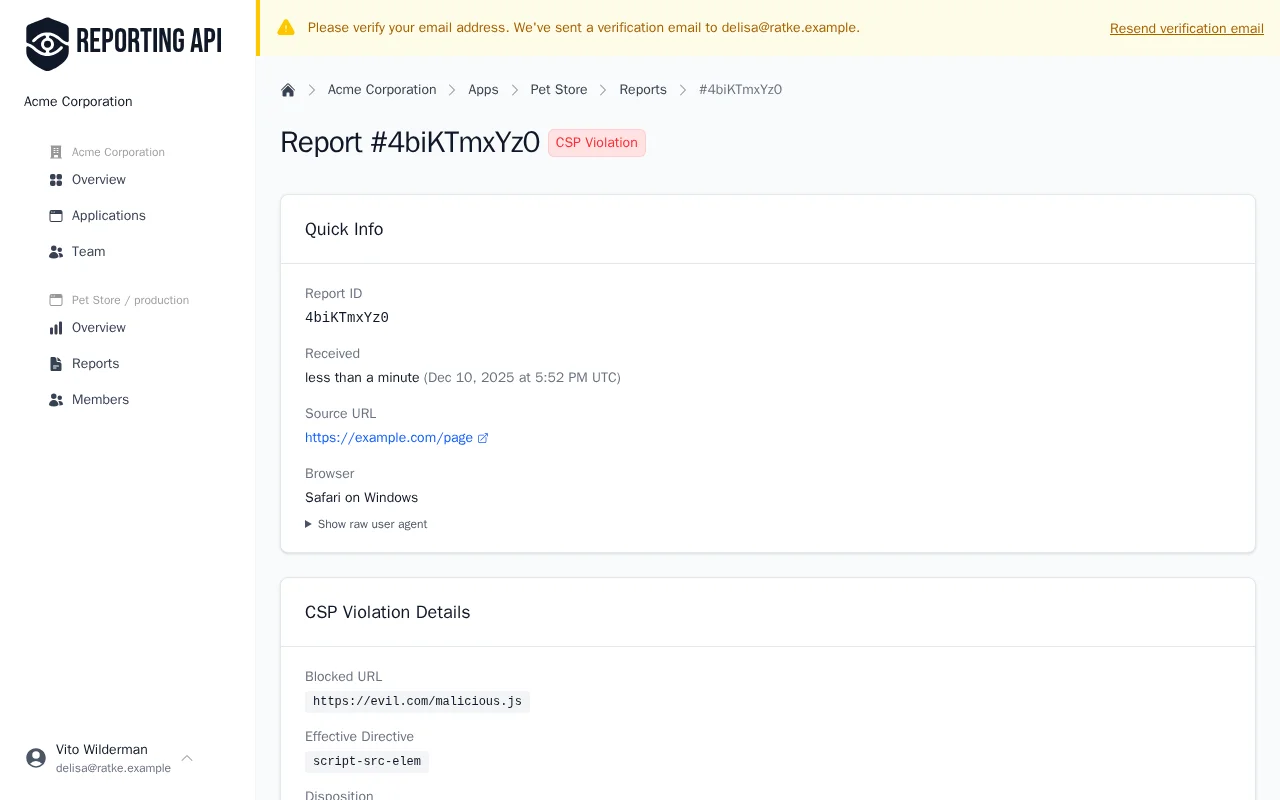
Report Fields
| Field | Description |
|---|---|
blockedURL |
URL of the blocked resource, or "inline" for inline scripts/styles
|
effectiveDirective |
The specific CSP directive that was violated (e.g., script-src-elem)
|
disposition |
"enforce" if the resource was blocked, "report" if Report-Only mode
|
sample |
First 40 characters of blocked inline code (useful for identifying XSS attempts) |
sourceFile |
URL of the file containing the violation |
lineNumber, columnNumber |
Exact location in the source file where the violation occurred |
documentURL |
URL of the page where the violation was triggered |
originalPolicy |
The full CSP header that was violated |
Example Report
{
  "type": "csp-violation",
  "url": "https://example.com/checkout",
  "body": {
    "blockedURL": "inline",
    "effectiveDirective": "script-src-elem",
    "disposition": "enforce",
    "sample": "console.log(\"injected code\")",
    "sourceFile": "https://example.com/checkout",
    "lineNumber": 42,
    "columnNumber": 1,
    "documentURL": "https://example.com/checkout",
    "originalPolicy": "default-src 'self'; script-src 'self'; report-to default"
  }
}
How to Act on Findings
-
blockedURL: "inline"— An inline script or style was blocked. Consider refactoring to external files, or add nonces/hashes if inline code is necessary. -
blockedURL: external domain— A resource from an unauthorized domain was blocked. If it's a legitimate third-party service, add it to your allowlist. If unexpected, investigate as a potential attack. -
disposition: "report"— The resource wasn't actually blocked (Report-Only mode). Safe to analyze and refine your policy before enforcement. -
High variety in
samplefield — Many different blocked code snippets may indicate XSS attack attempts. Review for patterns like<script>injection or encoded payloads.
HTML Meta Tag Alternative
CSP can also be set via an HTML <meta> tag:
<meta http-equiv="Content-Security-Policy" content="default-src 'self'; script-src 'self'">
Limitations of meta tags:
frame-ancestorsdirective is not supported (use HTTP header for clickjacking protection)report-toandreport-uriare not supported (no violation reporting)sandboxdirective is not supported- Must appear early in
<head>before any resources load
Recommendation: Use HTTP headers for production CSP. Meta tags are useful for testing or when you don't control server headers, but they cannot send violation reports.
Firefox Compatibility
Firefox does not support the modern report-to directive and Reporting-Endpoints header. For
maximum browser coverage (~96%), use both reporting methods:
Reporting-Endpoints: default="https://reporting-api.app/browser-reports/YOUR-UUID"
Content-Security-Policy: default-src 'self'; script-src 'self'; report-to default; report-uri https://reporting-api.app/browser-reports/YOUR-UUID
Modern browsers (Chrome, Edge, Safari) use report-to and ignore report-uri. Firefox uses
report-uri. Reporting API App handles both formats at the same endpoint.
Common Violation Types
| Directive | Common Causes |
|---|---|
script-src-elem |
Inline scripts, unauthorized external scripts, browser extensions |
style-src-elem |
Inline styles, unauthorized stylesheets, browser extensions |
img-src |
Images from unauthorized domains, data URIs, tracking pixels |
connect-src |
Fetch/XHR requests to unauthorized APIs, analytics beacons |
frame-ancestors |
Page embedded in unauthorized iframe (clickjacking attempt) |
Server Configuration Examples
Nginx
server {
    # ... your existing configuration ...

    # Reporting endpoint
    add_header Reporting-Endpoints 'default="https://reporting-api.app/browser-reports/YOUR-UUID"' always;

    # CSP with both reporting methods
    add_header Content-Security-Policy "default-src 'self'; script-src 'self'; report-to default; report-uri https://reporting-api.app/browser-reports/YOUR-UUID" always;
}
Ruby on Rails
Rails.application.config.content_security_policy do |policy|
  policy.default_src :self
  policy.script_src  :self
  policy.style_src   :self
  policy.img_src     :self, :data

  # Legacy report-uri for Firefox
  policy.report_uri "https://reporting-api.app/browser-reports/YOUR-UUID"
end

# Add Reporting-Endpoints header for modern browsers
# Note: Use lowercase header names for Rack 3 compatibility
Rails.application.config.action_dispatch.default_headers.merge!(
  "reporting-endpoints" => 'default="https://reporting-api.app/browser-reports/YOUR-UUID"'
)
Note: Rails doesn't natively support the report-to directive yet. The configuration
above uses report-uri for the CSP header. Modern
browsers will use the Reporting-Endpoints
header automatically when report-to default is specified in your policy.
Troubleshooting
Reports Not Appearing
- Check allowed origins — Ensure your website's origin is whitelisted in your application settings. Reports from unlisted origins are rejected.
-
Verify headers are sent — Use browser DevTools (Network tab) to confirm
Reporting-EndpointsandContent-Security-Policyheaders are present. - Wait for batching — Browsers may batch reports for up to 60 seconds before sending. Be patient after triggering a test violation.
-
Check browser support — If testing with Firefox, ensure you have
report-uriconfigured (Firefox doesn't supportreport-to).
Too Many False Positives
-
Browser extensions — Extensions inject scripts from
chrome-extension://,moz-extension://, andsafari-web-extension://URIs. These are not security threats. Reporting API App filters these automatically by default. - ISP-injected content — Some ISPs inject scripts for analytics or ads. These appear as violations from unknown domains.
- Antivirus software — Desktop antivirus may inject scripts to scan page content.
Policy Breaking Legitimate Features
-
Use Report-Only first — Always test with
Content-Security-Policy-Report-Onlybefore enforcement. -
Check the
blockedURL— Reports show exactly which resource was blocked. Add it to your allowlist if legitimate. -
Review inline code — If
blockedURLis"inline", you need to refactor or add nonces/hashes.
Next Steps
- Integrity (SRI) — Verify third-party script integrity
- Integrations — Route reports to your observability tools
- Getting Started — Set up your first application