Deprecations
Configure deprecation reporting to receive automatic alerts when your site uses browser APIs scheduled for removal — giving you advance warning to fix issues before they become emergencies.
New to deprecation monitoring? Read our Deprecations overview to understand the benefits before diving into configuration.
What are Deprecation Reports?
Browsers constantly evolve, and APIs that worked for years eventually get marked as deprecated and then removed. Deprecation reports are automatic notifications that browsers send when any code on your page — whether yours or third-party — uses a deprecated API.
These reports contain the same warnings you'd see in the developer console, but delivered to your backend
infrastructure. Each report includes the deprecated feature's ID, a human-readable message, the
anticipatedRemoval date (when the API will actually stop working), and the exact source location where
the deprecated code was called.
Unlike policy-based reports (CSP, COOP/COEP), deprecation reports require minimal configuration. Just add the
Reporting-Endpoints header, and browsers automatically send deprecation warnings to your
default endpoint. There's no additional header to configure — the browser handles everything.
Specification
- WICG Deprecation Reporting — Official specification
- MDN: DeprecationReportBody — API reference
Browser Support
Deprecation reporting has ~80% global browser support, covering Chromium-based browsers.
| Browser | Support | Notes |
|---|---|---|
| Chrome | 69+ | Full support |
| Edge | 79+ | Full support |
| Opera | 56+ | Full support |
| Firefox | — | Not supported |
| Safari | — | Not supported |
Why Monitor Deprecations?
Deprecation reports provide critical visibility into technical debt that's otherwise hidden:
-
Advance warning with deadlines — Reports include
anticipatedRemovaldates so you know exactly when APIs will break, not just that they're deprecated - Third-party script visibility — See deprecated API usage from vendor scripts running on your pages, even minified code you didn't write
- Convert breakage to maintenance — Turn "sudden production failures" into "scheduled engineering work" with months of lead time
- Prioritize technical debt — Focus on deprecations with imminent removal dates; ignore ones that have been deprecated for a decade
- Production-only detection — Some deprecated APIs are only used in specific user flows that local testing misses
Who Benefits
- Engineering managers — Get visibility into technical debt that's actually accumulating, with concrete deadlines for prioritization
- Frontend architects — Track deprecated API usage across the codebase and plan migrations proactively
- DevOps teams — Correlate deprecation warnings with browser version rollouts to predict impact
When to Enable
Deprecation reporting is recommended for all production websites. The report volume is typically low (only triggered when deprecated APIs are actually used), but the value is high — advance warning before browser updates break your site. Enable it from day one and let reports accumulate.
How to Configure
default endpoint. Unlike CSP or COOP/COEP, there's no
additional header to configure — just set up Reporting-Endpoints and you're done.
Step 1: Set Up the Reporting Endpoint
Define where browsers should send reports using the Reporting-Endpoints header:
Reporting-Endpoints: default="https://reporting-api.app/browser-reports/YOUR-ENDPOINT-UUID"
Replace YOUR-ENDPOINT-UUID with your application's unique endpoint from the
Reporting API App dashboard.
Step 2: That's It!
There's no additional configuration required. Once the Reporting-Endpoints header is in place, browsers
will automatically send deprecation reports to your default endpoint whenever deprecated APIs are used
on your pages.
Why so simple? Deprecation reports are always sent to the default endpoint group
— there's no way to override this behavior. The browser decides what's deprecated, not your configuration.
Step 3: Monitor Reports
After deploying the header, deprecation reports will start flowing automatically. Monitor incoming reports in your dashboard for:
- Your own code — Deprecations in files from your domain that you can fix directly
- Third-party scripts — Deprecations in vendor code that require updates from your vendors
- Urgent vs. long-term — Use
anticipatedRemovaldates to prioritize fixes
Step 4: Set Up Integrations
Route deprecation reports to your existing tools for alerting and backlog management:
- AppSignal integration — Track deprecations alongside application errors
- Webhook integration — Send reports to Slack, Jira, or custom endpoints
- Google Chat integration — Post alerts to team chat spaces
See the Integrations documentation for setup instructions.
Understanding Deprecation Reports
When deprecated APIs are used, browsers send JSON reports to your endpoint. Understanding these fields helps you prioritize fixes and track down the source.
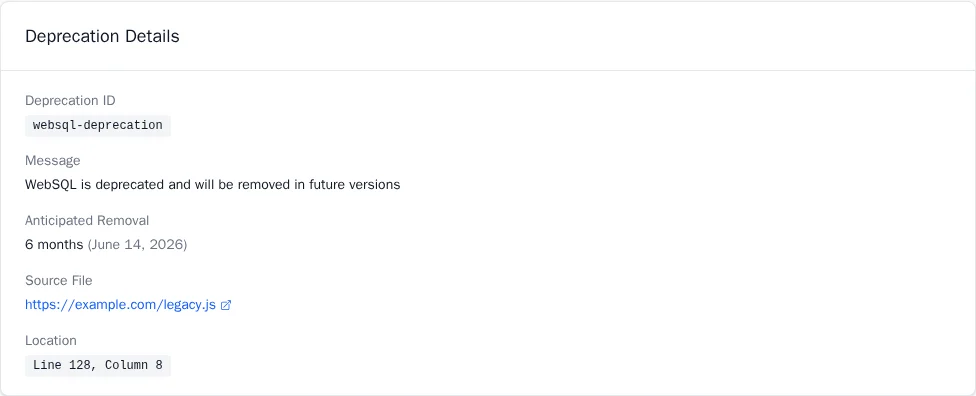
Report Fields
| Field | Description |
|---|---|
id |
Unique identifier for the deprecated feature (e.g., UnloadHandler). Use for grouping reports.
|
message |
Human-readable description matching the browser console warning |
anticipatedRemoval |
ISO 8601 date when the API will be removed, or null if unknown
|
sourceFile |
URL of the file where the deprecated API was called |
lineNumber |
Line number in the source file |
columnNumber |
Column number in the source file |
Example Report
{
  "type": "deprecation",
  "age": 42,
  "url": "https://example.com/checkout",
  "body": {
    "id": "UnloadHandler",
    "message": "Unload event listeners are deprecated and will be removed.",
    "anticipatedRemoval": "2026-04-01T00:00:00.000Z",
    "sourceFile": "https://example.com/scripts/analytics.js",
    "lineNumber": 127,
    "columnNumber": 15
  }
}
Interpreting anticipatedRemoval Dates
The anticipatedRemoval field is your most valuable prioritization tool:
- Date is present — The browser vendor has committed to a removal timeline. Plan accordingly.
- Date is null — No specific removal date is set. The API may stay deprecated for years. Lower priority.
- Date is in the past — The API has been removed in newer browser versions. Urgent fix required for users on updated browsers.
Common Deprecation IDs
Here are some frequently encountered deprecations and their removal timelines:
| ID | Feature | Timeline / Alternative |
|---|---|---|
UnloadHandler |
unload event |
Chrome 135-152 (Mar 2025 – Aug 2026). Use visibilitychange or pagehide.
|
SyncXHRInPageDismissal |
Sync XHR on unload | Blocked since Chrome 80. Use navigator.sendBeacon(). |
DocumentWriteBlocking |
document.write() |
Blocked on slow connections. Use dynamic script injection. |
NavigatorGetUserMedia |
Legacy getUserMedia |
Use navigator.mediaDevices.getUserMedia(). |
PrefixedVideoFullscreen |
Prefixed fullscreen APIs | Use standard Element.requestFullscreen(). |
For a complete list of deprecation IDs, see the Chrome Platform Status deprecation tracker.
Third-Party Script Attribution
One of the most valuable aspects of deprecation reports is identifying deprecated API usage in third-party scripts running on your pages — code you didn't write but are responsible for.
Identifying the Source
The sourceFile field tells you exactly where the deprecated API was called:
-
Your domain (e.g.,
https://example.com/scripts/app.js) — You can fix this directly -
Third-party domain (e.g.,
https://analytics.vendor.com/tracker.js) — Contact the vendor or find an alternative -
CDN-hosted library (e.g.,
https://cdn.jsdelivr.net/npm/old-library@1.0) — Update to a newer version
Common Third-Party Offenders
Watch for deprecations from these categories of scripts:
- Analytics trackers — Often use
unloadevents for session tracking - A/B testing tools — May use older DOM APIs
- Chat widgets — Can use deprecated storage or notification APIs
- Legacy jQuery plugins — May rely on deprecated browser behaviors
When third-party scripts cause deprecation reports, document the issue and contact the vendor with the report
details. The anticipatedRemoval date gives you leverage to request an update before your site breaks.
Server Configuration Examples
Nginx
server {
    # ... your existing configuration ...

    # Reporting endpoint for all report types including deprecations
    add_header Reporting-Endpoints 'default="https://reporting-api.app/browser-reports/YOUR-UUID"' always;
}
Ruby on Rails
# Add Reporting-Endpoints header for deprecation and other reports
# Note: Use lowercase header names for Rack 3 compatibility
config.action_dispatch.default_headers.merge!(
  "reporting-endpoints" => 'default="https://reporting-api.app/browser-reports/YOUR-UUID"'
)
Apache
Header always set Reporting-Endpoints 'default="https://reporting-api.app/browser-reports/YOUR-UUID"'
Troubleshooting
Reports Not Appearing
- Check browser support — Deprecation reports only work in Chromium-based browsers (Chrome, Edge, Opera). Firefox and Safari do not support this feature.
-
Verify headers are sent — Use browser DevTools (Network tab) to confirm the
Reporting-Endpointsheader is present in responses. - Check allowed origins — Ensure your website's origin is whitelisted in your application settings.
- Trigger a deprecation — Open DevTools console and run code that uses a deprecated API to verify reports are generated.
Too Many Reports from Third Parties
- Group by sourceFile — Identify which scripts generate the most reports and prioritize accordingly.
-
Filter by domain — Separate your code from vendor code based on the
sourceFiledomain. - Focus on anticipatedRemoval — Deprecations without removal dates can often be deprioritized.
Prioritizing What to Fix
- Sort by anticipatedRemoval date — Fix deprecations with the nearest removal dates first.
- Your code vs. vendor code — Prioritize your own code since you can fix it immediately.
- High-traffic pages — Deprecations on checkout or login pages impact more users.
Next Steps
- Interventions — Monitor browser interventions that block heavy ads and scripts
- Integrations — Route reports to your observability tools
- Getting Started — Set up your first application